Your comments

Hello Lakhshmi,
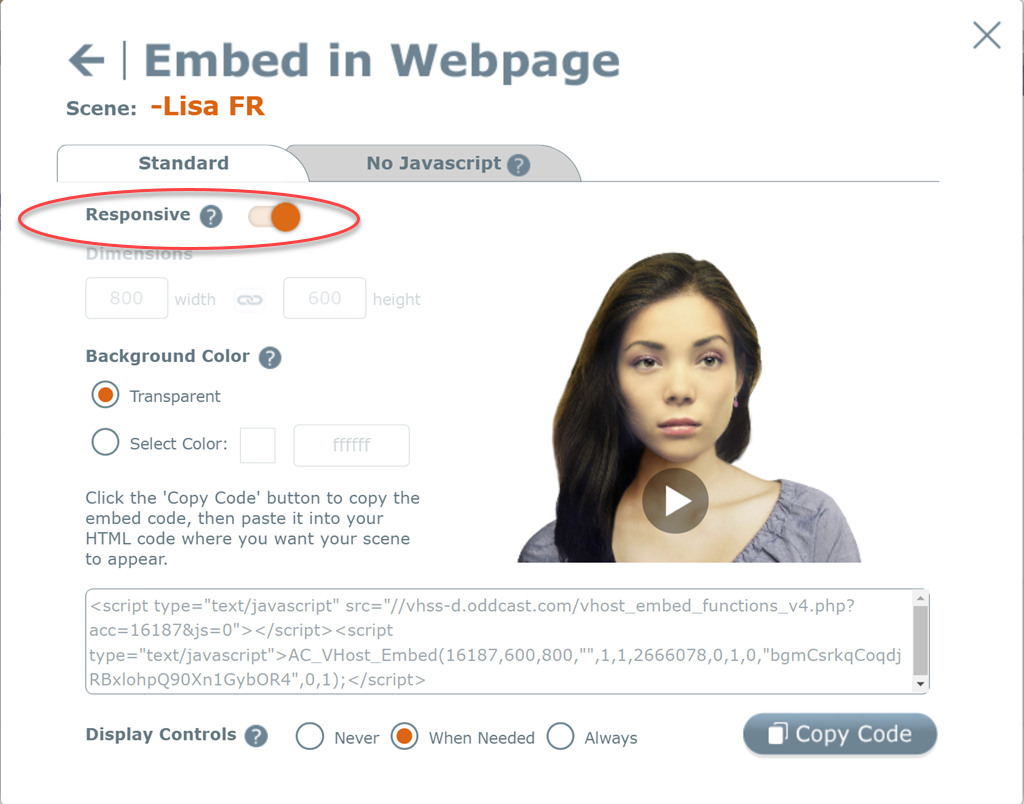
When you copy your embed code, in the "Publish" dialog, there is a "responsive" option at the top.
Turn this option ON - and copy the embed code again, to enable responsive behavior.
Here's an example of SitePal responsive behavior on a web page - if your page is designed to be responsive, it should work similarly to this example:
https://sitepal.com/api/examples/responsive.html
Please let me know how this worked for you.
Best,
Gil
The SitePal Team
Hello Sally!
You need to generate a video representation of the speaking avatar, which you can then import into Powerpoint.
SitePal support video generation, which allows you to generate your SitePal scene in the desired format and resolution - which you can then import into PowerPoint.
This feature is available with the SitePal Gold Annual Plan.
To see more detailed information & sign up for a Free Trial - please go to: www.sitepal.com/pricing
Hope this helps - let me know if I can further assist.
Regards,
Gil
The SitePal Team @ Oddcast
Thank you Diana for your kind words, they are much appreciated.
I am glad we were able to help effectively & in time for your deadline.
Best regards,
Gil

There may have been a momentary problem, but we are not aware of any recent downtime that may explain this.
We will investigate further.
Do you still see a problem on your website?
If you do - please send a note to support@sitepal.com & include the link to your page where the problem can be seen, and we will advise asap.
btw - the URL you listed works for me (you need to remove the ID3Only param to get the audio) - see -
Regards,
Gil
The SitePal Team
Great - I'm glad to hear it.
I've sent a note to engineering - but you found the solution first...
Take care,
Gil
Hi Eric -
Yes there is, on the SitePal support page:
Here is a direct link to the example:
https://sitepal.com/api/examples/react/index.html
And a direct link to the accompanying documentation, please review:
https://sitepal.com/docs/Embed_SitePal_in_JS_Frameworks.pdf
Hope this helps, lmk if any questions.
Regards,
Gil
Customer support service by UserEcho